Granting OAuth2 AuthZ in Entra
15 Jan 2026
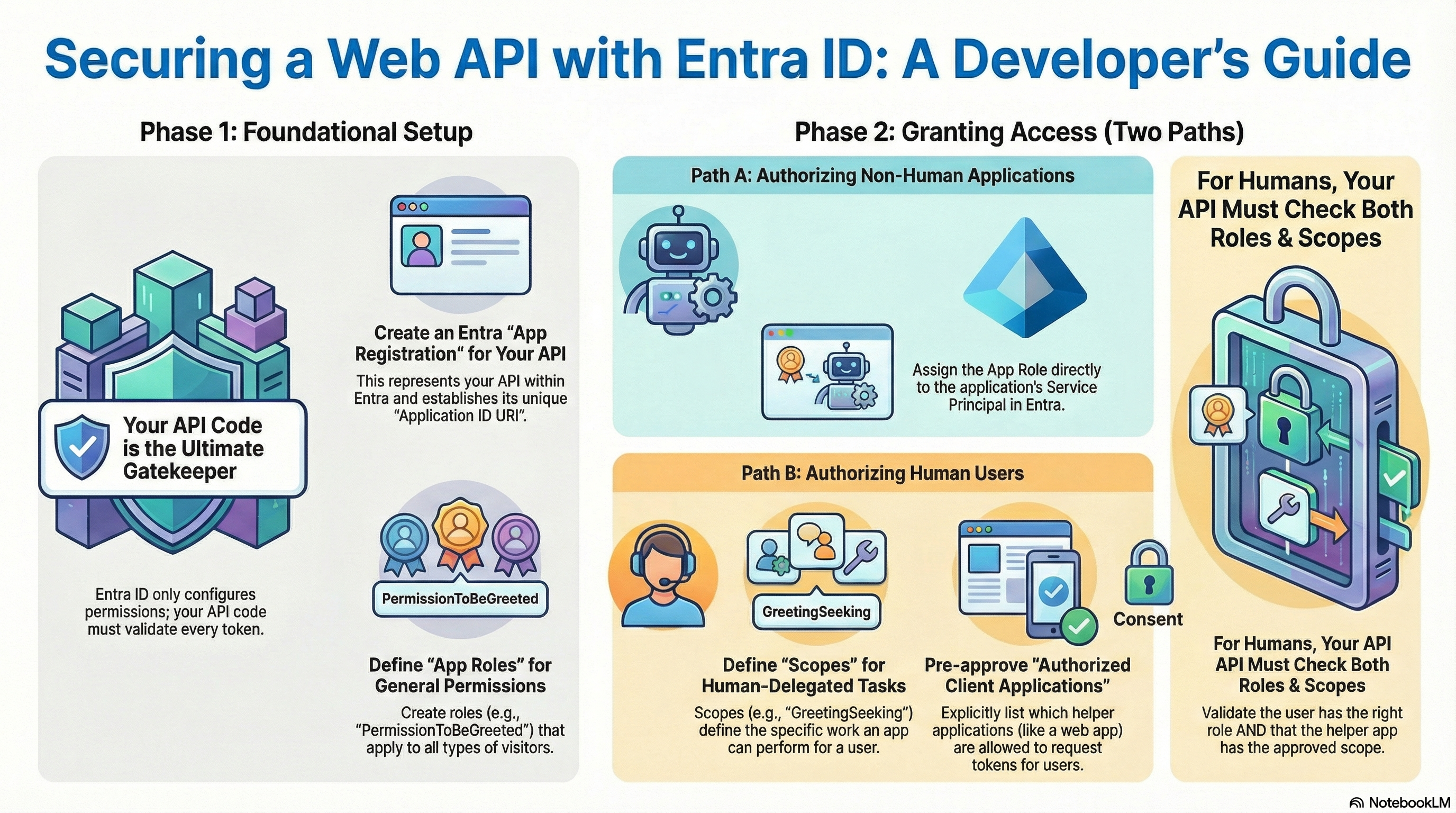
I recently had to troubleshoot an Entra issue that led me down a rabbit-hole crash course in OAuth / Microsoft Entra App Registrations (and their corresponding Entra Service Principals, a.k.a. Entra Enterprise Applications).
Hello world API
I haven’t blogged about it, but 3 years ago, I coded up a small HTTP(S) web API server using the .NET / C# programming framework/language. Check it out at web-site-dotnet-01-tiny.
There are two main ways to get my codebase up and running, so that it can actively receive HTTP requests and issue HTTP responses in return:
- Execute
dotnet runon your laptop (presuming you have the .NET SDK installed onto that laptop), which will give it a base URL likehttp://localhost:5000. - Publish it into a web server hosting service (here, let’s say Azure App Service), which will give it a base URL like
https://some.example.com.
My example’s 22 lines of code ensure that if you visit http://localhost:5000/api/SayHello/ / https://some.example.com/api/SayHello/, you will receive back an HTTP response status code of 200, and an HTTP response body containing the following text:
Hello World
The .NET code in charge of handling what happens when someone visits /api/SayHello looks like this:
[ApiController]
[Route("api/[controller]")]
public class SayHelloController : ControllerBase {
    [HttpGet(Name = "GetSayHello")]
    public IActionResult Get() {
        return Ok("Hello World");
    }
}
Protecting the SayHello endpoint
What if, though, just anyone, anywhere on the internet, to be able to receive a valid HTTP response each time they visited /api/SayHello? What if I only wanted to greet visitors I’ve decided should be making HTTP requests to /api/SayHello?
I could, of course, just upgrade my API’s .NET source code to reject all incoming HTTP requests that don’t include:
- an HTTP header named
X-Api-Keywith a value matching some super-secret password I gave all of my favorite visitors.
(Note: the actual HTTP response status code would be 401, issued via .NET’s Unauthorized() function, if the visitor got the password wrong or forgot to include one at all.)
Much fancier, though, and more compatible with enterprise-grade APIs, would be to protect /api/SayHello by rejecting all incoming HTTP requests that don’t include:
- an HTTP header named
Authorization… - …whose value starts with the phrase “
Bearer“… - …and the rest of whose value is an appropriate…
- …base64-encoded copy…
- …of the plaintext contents of a JSON Web Token (“JWT”)…
- …issued by an Identity Provider (“IdP”) of my choosing (in this article, Microsoft’s Entra ID)…
- …as part of an OAuth 2.0 authentication/authorization flow.
- Q: Whew! That was a lot. Why bother?
- A: Because all of those little technical details make it very easy for my API’s .NET code protecting
/api/SayHelloto determine whether or not the part that comes after “Bearer” is “appropriate.”
Here’s a sneak preview of the new .NET code in charge of handling what happens when someone visits /api/SayHello:
[ApiController]
[Route("api/[controller]")]
[Authorize(Roles = "PermissionToBeGreeted")]
public class SayHelloController : ControllerBase
{
    // You can get this response by visiting "/api/sayhello" (any capitalization of "sayhello" is fine)
    [HttpGet(Name = "GetSayHello")]
    public c Get()
    {
        // If the token represents a human
        // (has "oid" and "scp" claims, and not "azp"/"appid" only),
        // Then we also want to error out if
        // the Client Application that helped them acquire this
        // Bearer Token was not a Client Application that is allowed
        // to help the human do "GreetingSeeking" work.
        var user = HttpContext.User;
        var isHuman = user.HasClaim(c => c.Type == "scp");
        if (isHuman)
        {
            var scopes = user.FindAll("scp").Select(c => c.Value.Split(' ')).SelectMany(s => s);
            if (!scopes.Contains("GreetingSeeking"))
            {
                return Forbid("Missing required scope: GreetingSeeking");
            }
        }
        return Ok("Hello World");
    }
}
Identity providers cannot protect your API
Before we dive into how the IdP plays into all this, it’s important to emphasize:
An IdP cannot protect your API from issuing HTTP responses to visitors making unintended HTTP requests.
That is your job, as the .NET coder writing the API’s web server, as you can see above.
There’s a reason my .NET code snippet above exploded to 28 lines of code from its original 8. Please take your responsibilities as the person writing the code behind an HTTP(S) web API server very seriously.
If your .NET code forgets to actually validate incoming Bearer tokens against the IdP’s configuration settings, then /api/sayhello is going to 200 Hello World every HTTP request ever, and you’ve done nothing but waste your poor IdP admin’s time, asking for them to data-enter a bunch of configuration settings into the IdP.
That warning aside … let’s dive, now, into all of the configuration settings that can exist inside of your IdP, to support all of the amazing work you’ve done authoring defensive .NET code like:
Authorize(Roles="...")var isHuman = ...scopes.Contains(...)
IdP settings for all API visitors
Entra App Registration and its Identifier URI
In addition to my .NET code protecting /api/sayhello, what I didn’t show you earlier was a little bit of boilerplate in the overall web server’s Program.cs file that taught the whole web server exactly where within Entra to look while validating an incoming Bearer token against an IdP’s settings.
I’ll need an Entra admin to create an App Registration (named Greeter-Api, though that’s not important in this article, but it will be in future articles) and, in its “Expose an API” settings blade, give it an “Application ID URI” (a.k.a. “identifier URI”).
Once I find out what value they chose, I’ll want to configure my .NET server settings to know the following four details:
- The URI, starting with
api://, that the IdP admin chose to represent the App Registration.- Quick-and-dirty implementation tip: try putting it into a web server environment variable named
AZUREAD__AUDIENCE. - For the purpose of this article, let’s pretend the Entra admin told me it’s
api://123456578-1234-1234-1234567890ab.
- Quick-and-dirty implementation tip: try putting it into a web server environment variable named
- The “Client ID” GUID that Microsoft Entra auto-generated to represent the App Registration.
- Quicktip:
AZUREAD__CLIENTIDenvironment variable. - For the purpose of this article, let’s pretend the Entra admin told me it’s
123456578-1234-1234-1234567890ab.
- Quicktip:
- The “Tenant ID” GUID representing which company’s instance of Microsoft Entra the App Registration exists within.
- Quicktip:
AZUREAD__TENANTIDenvironment variable. - For the purpose of this article, let’s pretend the Entra admin told me it’s
98765432-9876-9876-9876-9876543210fe.
- Quicktip:
- The Entra “instance type” – usually just “
https://login.microsoftonline.com/” if you’re using Entra Commercial Cloud.- Quicktip:
AZUREAD__INSTANCEenvironment variable.
- Quicktip:
Not shown: in the .NET web API server’s Program.cs source code file, I had a few extra lines of code such as:
...
builder.Services.AddAuthentication(JwtBearerDefaults.AuthenticationScheme)
	.AddMicrosoftIdentityWebApi(builder.Configuration.GetSection("AzureAd"));
...
app.UseAuthentication(); // Ensures incoming requests get checked for well-formed bearer tokens issued by the IdP noted above.
app.UseAuthorization(); // Ensures policies like roles and scope checks get enforced.
...
App Roles
In my longer 28-line /api/sayhello code above, I, the .NET developer, decided I don’t want /api/sayhello to talk to any incoming HTTP request whose JWT Bearer token, freshly minted by the IdP, doesn’t include a claim named “roles” with a value that includes a role named “PermissionToBeGreeted.”
Here’s the thing: the incoming HTTP request’s Bearer token definitely isn’t going to include the word PermissionToBeGreeted if the IdP doesn’t even know that PermissionToBeGreeted is an option for it to included in Bearer. So let’s tell it!
Note: The roles claim type within a JWT Bearer token seems to correspond to an Entra-specific role-based access control (“RBAC”) concept called an “App Role,” not a generic OAuth concept.
Back in that 123456578-1234-1234-1234567890ab App Registration that my Entra admin created for me, in its “App Roles” settings blade, I’ll ask the Entra admin to declare that this App Registration contains an “App Role” named “PermissionToBeGreeted.”
App Role Assignments
Now my Authorize(Roles="...") .NET code will work great, rejecting all HTTP requests from visitors that don’t have permission to be greeted.
The problem is, we haven’t yet granted anyone permission to be greeted.
Let’s fix that: we’ll ask the IdP admin to configure the 123456578-1234-1234-1234567890ab App Registration so that exactly two Entra ID “principals” are allowed PermissionToBeGreeted:
- One nonhuman Entra principal ID (“Service Principal”)
- For the purpose of this article, we’ll say the nonhuman’s ID within Entra is
76767676-6767-6767-6767-767676767676.
- For the purpose of this article, we’ll say the nonhuman’s ID within Entra is
- One human Entra principal ID (“User”).
- For the purpose of this article, we’ll say the human’s ID within Entra is
34343434-4343-4343-4343-343434343434.
- For the purpose of this article, we’ll say the human’s ID within Entra is
Over in the “Users and Groups” settings blade of the Entra Service Principal (a.k.a. “Enterprise Application”) corresponding to the 123456578-1234-1234-1234567890ab App Registration that my Entra admin created for me, or over in the Entra Admin Center web portal, I’ll need the Entra admin to grant these two principals PermissionToBeGreeted and admin-consent on their behalf to having been given such an App Role Assignment.
Once that’s done, code running on a machine legitimately represented by the “Service Principal” ID 76767676-6767-6767-6767-767676767676 should stop erroring out when it makes an HTTP GET request to https://some.example.com/api/SayHello/, and should start getting a 200 response that says “Hello World.”
Hooray!
If 76767676-6767-6767-6767-767676767676 happened to represent an Entra Service Principal to which I happened to have the secret or certificate, I could even validate this for myself by:
- Logging into the Azure CLI as the Service Principal:
az login ` --service-principal ` --tenant '98765432-9876-9876-9876-9876543210fe' ` --username '76767676-6767-6767-6767-767676767676' ` --password 'the_secret' ` - Making an HTTP request that uses a
Bearertoken representing that Service Principal:$bearer_token = ( az account get-access-token ` --resource 'api://123456578-1234-1234-1234567890ab' ` --tenant '98765432-9876-9876-9876-9876543210fe' ` --query 'accessToken' ` --output 'tsv' ) $response = Invoke-WebRequest ` -Uri "https://some.example.com/api/SayHello/" ` -UseBasicParsing ` -Headers @{ 'Authorization' = "Bearer $bearer_token" } $response.StatusCode # Should be 200 $response.Content.Trim() # Should be "Hello World" $bearer_token = $null
Note: If 76767676-6767-6767-6767-767676767676 represents, say, an Azure resource’s system-assigned managed identity (“SMI”), you’re out of luck for noodling around on your laptop – you’ll have to actually deploy similar code onto the Azure service in question if you want to see the 200 reponse in action. This is because you can’t manually pretend to “be” an Entra Service Principal that corresponds to a SMI, using az login --service-principal. (That’s part of what’s implied by “system-managed.”)
All of this resulted in a 200 response because nonhumans are allowed to request OAuth 2.0 Client Credentials Grant-typed Bearer access tokens from IdPs, which sort of “just work.”
IdP settings for human visitors
Human 34343434-4343-4343-4343-343434343434 is not so lucky, and would not yet get a 200 response from /api/SayHello.
Remmeber, my .NET app also includes code such as:
var isHuman = ...scopes.Contains("GreetingSeeking")
Heck, they wouldn’t even get a Bearer token out of the Entra IdP just yet.
Even though 34343434-4343-4343-4343-343434343434 is authorized with PermissionToBeGreeted, they still need a computer program to help them request an OAuth 2.0 Authorization Code Grant-typed Bearer access token out of the Entra IdP.
Entra will refuse to issue a human Bearer token to the helper-computer-program unless the request for one specifies:
- Which type of computer program is helping this human (A web site? The Azure CLI desktop tool? The VSCode desktop software? Etc.), and
- Exactly which types of work (OAuth 2.0 “scopes”) the helper-computer-program promised assistance on to the human.
- That the Entra IdP configuration settings were expecting this exact helper-computer-program to be assisting humans with this exact type of work.
- That this particular human actually consented (whether personally or implicitly based on Entra IdP configuration settings) to let this exact helper-computer-program assist them with this exact type of work.
Scopes
In my longer 28-line /api/sayhello code above, I, the .NET developer, decided I don’t want /api/sayhello to talk to any incoming HTTP request whose JWT Bearer token, freshly minted by the IdP, doesn’t include a claim named “scp” with a value that includes a scope named “GreetingSeeking.”
As with roles, the incoming HTTP request’s Bearer token definitely isn’t going to include the word GreetingSeeking if the IdP doesn’t even know that GreetingSeeking is an option for it to included in Bearer. So let’s tell it!
Back in that 123456578-1234-1234-1234567890ab App Registration that my Entra admin created for me, in its “Expose an API” settings blade, in the section labeled “Scopes,” I’ll ask the Entra admin to declare that this App Registration understands the concept of an “OAuth 2.0 Scope” named “GreetingSeeking.”
Authorized Client Applications
However, we haven’t yet told Entra which helper-computer-programs are allowed to offer humans assistance getting a Bearer token for the alleged purpose of seeking a greeting.
Important: I say “alleged” because if the .NET code doesn’t actually include any code like scopes.Contains("GreetingSeeking") before deciding what HTTP response to give an incoming HTTP request, it’s not the Entra IDP’s fault that .NET didn’t do a 2nd round of authorization (“authZ”) due diligence.
The first round was validating the “roles” claim, which applies to human and nonhuman HTTP(S) request alike.
This 2nd round of authorization that the .NET author ought to include, when the Bearer tokenholder is human, is meant to validate that the helper-computer-program isn’t going rogue and tricking the human into doing something the human never meant to let that exact helper-computer-program assist them with. If the helper-computer-program only said it wanted to assist with something innocent like GreetingSeeking, then it’s .NET’s job to validate that that’s all the incoming HTTP request is actually trying to do.
So, for example, maybe this particular .NET web API suite includes some endpoints that can read email out of Outlook.
Human 34343434-4343-4343-4343-343434343434 might be fine with the https://outlook.office365.com web site reading their emails, but they might be a lot less keen on https://visit-here-for-a-happy-greeting.com web site doing anything more than saying “Hello World” to them.
The Entra IdP admin can do what I’m about to describe below, and specify that only the Outlook website should be assisting humans with the EmailReading “scope,” and that both the Outlook website plus the Visit-Here-For-A-Happy-Greeting website should be assisting humans with the GreetingSeeking “scope.”
It’s still up to the .NET API responding to HTTP requests to bother to check what’s in the JWT Bearer token’s “scp” claim before proceeding to return a response from /api/SayHello or from /api/CheckEmail.
Anyway, let’s go ahead with setting up the alleged authorized client applications list inside Entra, shall we?
- (Now that we’ve reiterated so many times that this is just “alleged” permission to assist a human, and that it’s up to the actual API server to care which allegations the JWT
Bearertoken are marked by the Entra IdP as “meant for” assisting with.)
We’ll ask the IdP admin to configure the 123456578-1234-1234-1234567890ab App Registration so that exactly one Entra ID “principal” is allowed to help humans acquire Bearer tokens marked as meant for GreetingSeeking:
- The GUID representing Microsoft’s Azure command-line interface (“CLI”) tool.
- This is
04b07795-8ddb-461a-bbee-02f9e1bf7b46.
- This is
Back in that 123456578-1234-1234-1234567890ab App Registration that my Entra admin created for me, in its “Expose an API” settings blade, toward the bottom in the section labeled “Authorized Client Applications,” I’ll ask the Entra admin to pre-approve the Azure CLI to help humans seek greetings by granting Client ID 04b07795-8ddb-461a-bbee-02f9e1bf7b46 the api://123456578-1234-1234-1234567890ab/GreetingSeeking authorized scope.
Once that’s done, code running on a machine legitimately represented by the human ID 34343434-4343-4343-4343-343434343434 should stop erroring out when it makes an HTTP GET request to https://some.example.com/api/SayHello/, and should start getting a 200 response that says “Hello World.”
Hooray!
If I were human 34343434-4343-4343-4343-343434343434, then I could even validate this for myself in the Azure CLI by doing the following:
- Prerequisite, just once per machine: do a weird logout-login dance so that I, specifically, can click the flows (note: probably hidden behind other windows, annoyingly, so minimize windows looking for them) to specifically confirm that yes, I want the Azure CLI to help me seek greetings:
# BEGIN: Block of code that only has to be run once on a given machine az logout az login ` --tenant '98765432-9876-9876-9876-9876543210fe' ` --scope 'api://123456578-1234-1234-1234567890ab/GreetingSeeking' # Popups might be behind your other windows; if things seem to run slow, check for them. # Any human except `34343434-4343-4343-4343-343434343434` # should get 403'ed out because they aren't authZ'ed # (authZ phase 1) # for the `PermissionToBeGreeted` **role**. # But even other humans should still be taken # through the flow of getting a Bearer token. # And that Bearer token will even include the `GreetingSeeking` scope. # (But that should be irrelevant, because the .NET should not # even bother to check authZ phase 2 if authZ phase 1 failed.) # Popups should, I believe, warn all humans who # seek a bearer token using this code # that the Azure CLI ALLEGEDLY # wants to help them **SEEK GREETINGS**. # Anyway, this "az login" step fails if the Azure CLI is not on the # preapproved list of Authorized Client Applications # allowed to help humans "seek greetings." az logout az login # END: Block of code that only has to be run once on a given machine - Make an HTTP request that uses a
Bearertoken representing me and the “scopes” Entra confirmed that I’ve allowed my helper-computer-program to ask to help me with:# BEGIN: Block of code that has to be run every time a human wants to be greeted $bearer_token = ( az account get-access-token ` --resource '123456578-1234-1234-1234567890ab' ` --tenant '98765432-9876-9876-9876-9876543210fe' ` --query 'accessToken' ` --output 'tsv' ) # The above attempt to fetch a bearer token # will fail if the Azure CLI is not # an "authorized client application" for # any "scopes" over in Entra IdP configuration settings. # If it's preauthorized to help humans with at least 1 "scope," # I believe that Entra will issue a JWT Bearer token # whose "scp" claim details include a list of all of the # scopes that the Azure CLI has both: # 1. Both been preauthorized to help humans in general with, and # 2. Been authorized, as during "az login --scope" above, # by this particular human, to help them specifically with. # But I need to try all the nuances again; I forget a lot of it. $response = Invoke-WebRequest ` -Uri "https://some.example.com/api/SayHello/" ` -UseBasicParsing ` -Headers @{ 'Authorization' = "Bearer $bearer_token" } $response.StatusCode # Should be 200 $response.Content.Trim() # Should be "Hello World" $bearer_token = $null # END: Block of code that has to be run every time a human wants to be greeted
No authorized desktop clients
Hot take: Despite the Azure CLI being my teaching example, I don’t think you actually should authorize software that runs directly on a general-purpose desktop computer to serve as an Authorized Client Application to your enterprise web APIs.
They’re far too much “general computation” that can go rogue on an endpoint without much oversight, compared to a proper web site running in a web browser that a human will notice.
No Azure CLI, no Azure PowerShell, no VSCode, no Visual Studio, etc. etc. etc.
Your enterprise web APIs don’t just greet people – they do stuff that a general-purpose programming environment like an IDE or CLI just really shouldn’t be left lying around as something willing to “helpfully” act on behalf of humans who need to make calls to your enterprise web APIs.
If your developers need to emulate a nonhuman, make them create an actual second nonhuman, like in the 76767676-6767-6767-6767-767676767676 example above. The gap between “nonhuman” and “human,” in OAuth, is just too wide, and it’s probably more secure to authorize a second nonhuman to take the place of a first one than it is to suddenly add humans where there weren’t humans.
Even if your app already has legitimate frontend web sites as Authorized Client Applications that help humans acquire Bearer tokens out of Entra, those are deterministic pieces of JavaScript that hopefully you control the publication of, and that have controlled rates of change. They’re not just, say, a virus running loose on a laptop poking at the Azure CLI or the VSCode terminal.
I’m sure there are exceptions, but I think that “just don’t” is a good rule of thumb. Don’t add desktop tools’ GUIDs to your Authorized Client Applications that are allowed to request Bearer tokens into your internal web APIs on behalf of humans. Require some serious governance / exception hurdles, is what my gut is telling me.
I’m no identity architect, but my gut, as a general-purpose security-minded architect, is even telling me to consider going so far as to run scripts to look for major desktop tool GUIDs in Entra and kick them out periodically if they don’t have an exception.
More to come
Oofda. You tired yet? I was, figuring all this out!
Not covered: other “blades” of Entra App Registration settings, like the one labeled “API Permissions,” which is … like … kind of the opposite of what this article covered. (Hint on that: thanks to the App Role Assignments our IdP admin did, if 76767676-6767-6767-6767-767676767676 happened to be the type of Entra Service Principal that comes from an Entra App Registration, then its PermissionToBeGreeted by 123456578-1234-1234-1234567890ab would automatically show up ,marked as type “Application”, within the “Configured Permissions” section of 76767676-6767-6767-6767-767676767676’s own “API Permissions” configuration-settings blade! That’s what I mean by it kind of being “the opposite” side of authZ from what we covered today. Today we covered “granting” alleged authorization; “API Permissions” has more to do with “requesting” alleged authorization. Either way, please remember – it’s all alleged! Entra is just a record of alleged/desired authorization grants. API server coders still have to program their codebases to care what Entra thinks!)
LLM enhancements
I ran this article through an LLM and it had some pretty great enhancements.
Infographic
It autogenerated the infographic serving as this post’s header image.
Quiz
I love this 10-question quiz it came up with.
- (click expander icon at left – it’s a rightward-facing triangle – to reveal the quiz questions below)
- According to the source material, what is the primary limitation of an Identity Provider (IdP) regarding API security?
- A: An IdP cannot protect your API from issuing responses to unintended requests.
- B: An IdP cannot generate Bearer tokens for non-human service principals.
- C: An IdP is unable to store custom App Roles for specific applications.
- D: An IdP cannot distinguish between human and non-human visitors.
- Which claim in a JSON Web Token (JWT) is used to verify Entra-specific ‘App Roles’ for both humans and non-humans?
- A: scp
- B: aud
- C: roles
- D: azp
- In a .NET web API, what is the purpose of the $app.UseAuthorization()$ middleware command?
- A: It ensures that policies like roles and scope checks are actively enforced.
- B: It checks the incoming request for a well-formed Bearer token issued by the IdP.
- C: It generates the Identifier URI required for the ‘Expose an API’ blade.
- D: It automatically grants permission to all visitors with a valid Tenant ID.
- What is the prefix used for the Application ID URI when configuring the ‘Expose an API’ settings in Entra?
- A: https://
- B: api://
- C: oauth2://
- D: bearer://
- Why does the author suggest that developers should NOT authorize desktop tools like the Azure CLI as ‘Authorized Client Applications’ for enterprise APIs?
- A: They provide a general-purpose environment that can be exploited by malware or rogue scripts.
- B: The Azure CLI cannot acquire Bearer tokens for human users.
- C: Desktop tools are incompatible with OAuth 2.0 Authorization Code flows.
- D: Entra ID does not allow GUIDs of desktop tools to be added to the pre-approval list.
- Which OAuth 2.0 grant type is typically used by non-human service principals to acquire a Bearer token?
- A: Authorization Code Grant
- B: Implicit Grant
- C: Resource Owner Password Credentials Grant
- D: Client Credentials Grant
- What happens if a developer forgets to validate incoming tokens in their .NET code, according to the source material?
- A: The .NET runtime will throw an exception and prevent the web server from starting.
- B: The endpoint will return a
200OK status for every request, regardless of identity. - C: The IdP will automatically block all requests to that API’s server.
- D: The API will return a
401Unauthorized error by default.
- What is the purpose of the ‘Authorized client applications’ section in the ‘Expose an API’ blade?
- A: To list the IP addresses allowed to call the API.
- B: To define the client secrets for non-human service principals.
- C: To specify which users can access the API.
- D: To pre-approve specific client programs to help humans acquire tokens for specific scopes.
- What does the ‘scp’ claim in a JWT represent?
- A: The specific permissions the helper program has requested to assist the human with.
- B: The unique identifier for the user’s session.
- C: The expiration time of the token.
- D: The issuer of the token.
- What is the recommended way to secure an API that needs to be accessed by both human users and non-human service principals?
- A: Use API keys for all authentication.
- B: Implement OAuth 2.0 with different grant types for humans and non-humans.
- C: Rely solely on IP whitelisting for non-human access.
- D: Use Basic Authentication with username/password for all access.
- Answers (click expander icon at left – it’s a rightward-facing triangle – to reveal the answers)
- A
- The author emphasizes that the responsibility for validating tokens and enforcing access control lies with the developer writing the API server code, not the IdP itself.
- C
- The ‘roles’ claim corresponds to the RBAC concept of ‘App Roles’ defined within the Entra App Registration.
- A
- Authorization middleware is responsible for checking the specific permissions (like roles) required by endpoints after a user has been authenticated.
- B
- The Identifier URI, which represents the App Registration, typically starts with this protocol prefix.
- A
- The author argues that desktop tools lack the deterministic control and oversight found in managed web applications, posing a higher security risk.
- D
- This grant type allows non-human identities to authenticate directly with the IdP using a secret or certificate to obtain a token.
- C
- Without validation code, the API has no mechanism to reject unauthorized traffic, rendering the IdP configurations useless.
- D
- This setting allows an admin to specify which apps are allowed to assist humans with defined work scopes, often bypassing individual consent prompts.
- A
- The ‘scp’ (scope) claim identifies the specific permissions the helper program has requested to assist the human with.
- B
- The source material demonstrates using different OAuth 2.0 grant types (Authorization Code for humans, Client Credentials for non-humans) to securely authenticate both types of principals.
Simpler blog post
Dangit, the LLM’s a better, clearer blogger than me. I love its (albeit very American) metaphors about the DMV vs. the bouncer.
- (click expander icon at left – it’s a rightward-facing triangle – to reveal the blog post titled “Securing Your API: A Simple Guide to OAuth2, Roles, and Scopes with Entra ID”)
Introduction: Beyond a Simple Password
Imagine you’ve built a simple API that returns the message “Hello World.” At first, anyone can access it. But what if you only want to greet approved visitors? You could use a simple password, like a secret X-Api-Key that you share with your friends. This is like having a single, physical key to a large office building. Anyone who has a copy of the key can get in and access every room, and if the key is lost or stolen, you have a major security problem.
Modern applications need a more sophisticated system. The goal is to ensure that for our “Hello World” API, only approved visitors can get a greeting. To do this the enterprise-grade way, we use a system called OAuth2 and an Identity Provider (IdP) like Microsoft Entra ID. This combination acts less like a single key and more like a modern company ID badge system. It provides a secure, verifiable, and temporary “ID badge” for every single request, detailing not just who you are but also what you’re allowed to do.
Ultimately, no matter what credentials a visitor presents, your API itself is the final gatekeeper responsible for checking that ID and making the final decision.
1: The API is the Bouncer, Entra ID is the DMV
The most critical concept to understand in API security is the division of responsibility. The Identity Provider (Entra ID) and your API code have separate but complementary jobs.
An IdP cannot protect your API from issuing HTTP responses to visitors making unintended HTTP requests.
That is your job, as the… coder writing the API’s web server…
To make this clear, think of it with an analogy:
- Microsoft Entra ID is the Department of Motor Vehicles (DMV). Its job is to issue official, verifiable identification cards to people who prove who they are.
- Your API server’s code is the bouncer at a club door. The bouncer’s job is to check every ID card to make sure it’s authentic, not expired, and that the person on the ID is on the guest list.
The DMV doesn’t stand at the club door; the bouncer does. Similarly, Entra ID issues credentials, but your API code must be programmed to check them on every request.
The “ID card” in this system is called a Bearer Token. It’s a secure, digitally-signed credential (specifically, a JSON Web Token or JWT) issued by Entra ID. A client application shows this token to the API inside the Authorization HTTP header with every request to prove it has permission to be there.
Now that we know the API is responsible for checking credentials, let’s explore how those permissions are defined in Entra ID in the first place.
2: Who is Allowed In? The First Check with “App Roles”
The first question the API bouncer needs to answer is, “Is this person on the guest list?” In Entra ID, this is handled by App Roles.
An App Role is a fundamental permission that grants access to a specific user or application. It’s defined within the API’s own configuration (its “App Registration”) in Entra ID. For our example, we can create an App Role called PermissionToBeGreeted.
However, simply defining the role isn’t enough. It must be assigned to someone who needs access. In the provided example, this permission was assigned to two distinct types of “principals”:
- A Non-Human: A “Service Principal,” which represents another automated service or application that needs to call the API.
- A Human: A specific “User” account for a person.
For a non-human service principal, this is all it needs. The API’s code performs a single authorization check. Using a line of code like [Authorize(Roles = "PermissionToBeGreeted")], it inspects the incoming token for the presence of this role. If the role is present, access is granted, and the service gets its “Hello World” response. This is the first and only authorization check required for applications.
For humans, however, simply being on the guest list isn’t always enough. A second check is needed to ensure their safety and control.
3: What is this App Doing for You? The Second Check with “Scopes”
When a human uses an application—a “helper-computer-program” like a website or a command-line tool—to access an API, a new security question arises: what is this application allowed to do on the human’s behalf?
This is where Scopes come in. An OAuth 2.0 Scope is a specific, granular permission that defines a type of work. For our API, we could define a scope called GreetingSeeking. When a user logs in through a helper application, they must consent to letting that application perform actions within that scope.
This leads to a two-part check that the API code must perform for any token that represents a human:
- The Role Check: First, the API checks if the human has the
PermissionToBeGreetedrole. If they aren’t on the “guest list,” they are rejected immediately. - The Scope Check: If the role check passes, the API performs a second check: does the token also contain the
GreetingSeekingscope? This confirms that the specific application the human is using has been explicitly authorized to “seek a greeting” for them.
This second check is crucial for security. It prevents a malicious or overreaching application from tricking a user. For example, a user might be perfectly fine allowing the official Outlook website to act on their behalf with an EmailReading scope. However, they would not want a simple greeting website, which was only granted the GreetingSeeking scope, to suddenly be able to read their email. The scope check ensures a helper-computer-program only performs the specific actions a user consented to.
Understanding these two distinct checks is the key to a secure API. Let’s summarize the differences directly to make them crystal clear.
4: Summary: Roles vs. Scopes at a Glance
App Roles and Scopes are both essential for security, but they answer different questions. The table below summarizes their distinct purposes.
| Concept | App Role | Scope |
|---|---|---|
| Core Question | Who can access the API? | What can a specific app do for a human? |
| Applies To | Humans and Non-Humans (Service Principals) | Humans Only |
| Analogy | The Guest List | The Activity Waiver |
| Example from Text | PermissionToBeGreeted |
GreetingSeeking |
With these two mechanisms working together, the API can confidently determine who has access and what they are allowed to do.
5: Conclusion: A Final Word of Caution
Based on these security principles, the source author offers a strong piece of practical advice: you should be extremely cautious about allowing general-purpose desktop tools (like the Azure CLI or VSCode) to act as “Authorized Client Applications” for your internal enterprise APIs.
The reasoning is that these tools represent a “general computation” environment that is much harder to secure and control compared to a specific web application whose code you manage. A virus running on a laptop could potentially poke at the Azure CLI to abuse the permissions a user has granted.
Securing a modern API is a partnership. Microsoft Entra ID acts as the trusted authority that issues verifiable credentials. But your API code must be programmed to be a smart and vigilant bouncer, checking every credential for both who has access (Roles) and what they are trying to do through a specific application (Scopes).
